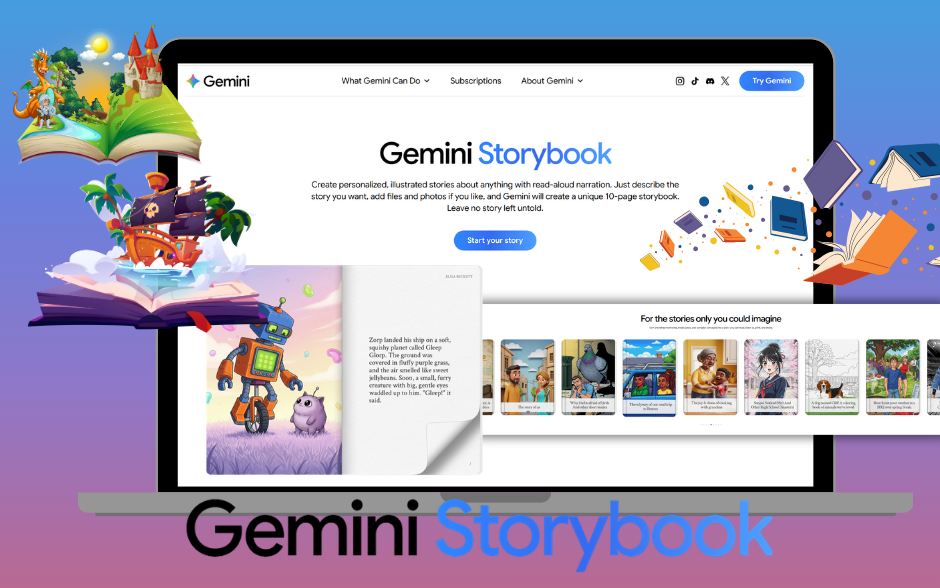
We know from research and classroom experience that language is acquired through meaningful, comprehensible input. I know I am not alone when I share that language educators are constantly looking for ways to make input comprehensible, personalized, and engaging. When used thoughtfully, the Storybook Gem by Google can support comprehensible input, storytelling, literacy development, and creative output in so many powerful ways.
Let’s break down using Gemini’s Storybook Gem.
First, you’ll need access to Gemini by Google. Many schools are adopting Gemini as their preferred Large Language Model, especially if you are using Google for Education. If that’s the case, you’ve probably already noticed little bits of generative AI sprinkled into your email replies, slide decks, and spreadsheets.
Once opening Google Gemini, you should see a Gems icon on the left hand side of your screen. When clicking on the Gem icon, there are several pre-made Gems by Google. You are welcome to create your own Gem (same concept as a Custom GPT in ChatGPT) or pursue the options made available by Google.
Once you locate the Storybook Gem, you will already want to have your text written & ready to be used for the Gem’s storybook creation purposes. I prefer this since I am keeping in mind my novice or intermediate learners – I want the text to feel familiar and use vocabulary & structures they are familiar with.
If you have used Generative AI to help you write a story, have your own original text, have co-created stories with students or wish to have students create their own text to be used in these storybooks, the possibilities are endless with writing & promoting creativity with the use of this incredible tool! Check out this previous blog post highlighting how to build literacy in the language classroom with more tips & ideas!
Here is a sample prompt for the Storybook Gem to help guide you:
Create an illustrated storybook using ONLY the original story provided, DO NOT MAKE ANY CHANGES TO ANY TEXT – KEEP THE STORY TO MATCH WITH WHAT IS PROVIDED ONLY, so the ORIGINAL TEXT here is reflected EXACTLY within the illustrated story with ZERO CHANGES.
Here is the original text: ________________.
In the above prompt, where we highlight create an illustrated storybook, you can certain include different styles and elements to make your storybook more engaging for your students. You can include artistic styles such as watercolor illustration, soft pastel children’s book style, bold comic book style, minimalist line art, collage style with mixed media textures, hand-drawn sketch style, digital flat illustration, Pixar-inspired 3D animation style, Studio Ghibli-inspired whimsical style, vintage storybook illustration, realistic portrait style, surrealist dreamlike art, impressionist painting style, folk art style, mural-inspired street art style, paper cut-out style, stop-motion clay animation aesthetic, graphic novel noir style, bright pop art style, and textured oil painting style or fun twists connected to pop culture such as Pixar-style 3D animation, Studio Ghibli whimsical fantasy worlds, Disney classic fairytale illustration, Marvel or DC comic book panels with bold action frames, anime or manga style with expressive eyes and dramatic emotion, graphic novel noir style like Batman, Tim Burton-inspired gothic whimsical style, The Simpsons-style cartoon exaggeration, Spider-Verse dynamic comic style with layered textures, LEGO movie-style block animation, Minecraft pixelated block art, Fortnite vibrant digital action style, Taylor Swift music video aesthetic with cinematic color palettes, Billie Eilish moody neon dreamscape style, Wes Anderson symmetrical pastel cinematic style, Barbie-core bright pink pop aesthetic, retro 80s synthwave neon style, vintage 90s Nickelodeon cartoon vibe, graffiti street-art style inspired by urban murals, or K-pop music video inspired bold color fantasy styling.
After your very well written prompt is provided to the Storybook Gem, the output will look like a digital book and the Gem can read the story out loud for your students to follow along! When using this tool to create comprehensible readings for my students, we also do several pre-during and post reading activities – with the intention of repeating & recycling this language often and ultimately, demonstrating their own use of the structures through story retellings.
Some reading strategies to consider:
- Predict the theme.
- Identify repetition.
- Retell in pairs.
- Compare characters.
- Discuss the message.
- Connect to larger social themes.
- Adapt the ending.
- Create their own version.
Repetition + personalization + creativity = acquisition.
One last great feature is the stories are downloadable as PDF files – so if you wanted to print the teacher or student created stories, you can extend the reading through a gallery walk to read one another’s printed stories, small group sharing by comparing & contrasting their creations, or showcase their stories with your school community.
Digital storytelling and digital story creation can serve your classroom community in so many different ways! A previously recorded workshop on Youtube also highlights the steps to digital storytelling and some helpful ways to get started, if this is your first time having students create digital stories!
Storybook Gem within Gemini gives language teachers something powerful: The ability to generate meaningful, illustrated, personalized stories in minutes. It’s about stories and we all have stories to tell. With Storybook Gem, those stories come to life beautifully, creatively, and easily accessible — for both you and your language learners. ✨ And that might just be my favorite GEM of all.